The Ultimate Guide to Peer-to-Peer Fundraising for Churches
One of the most efficient fundraising strategies for churches is peer-to-peer fundraising. In addition to being a fantastic way to increase overall donations, it’s a fun way for your congregants to get involved and fundraise on your behalf! With peer-to-peer fundraising for churches, you can encourage church members to raise funds for you and help…
One of the most efficient fundraising strategies for churches is peer-to-peer fundraising. In addition to being a fantastic way to increase overall donations, it’s a fun way for your congregants to get involved and fundraise on your behalf!
With peer-to-peer fundraising for churches, you can encourage church members to raise funds for you and help you reach more people in the community. You’d also want to make this simple and quick for your fundraisers (and for your church) and thus, choosing the right tool is crucial.
In this article, we’ll walk you through everything you need to know about church peer-to-peer fundraising, including how to use it, tips to help your fundraisers, and steps to get started with Donorbox Peer-to-Peer.
First, let’s establish why your church should use peer-to-peer.
Why Should Your Church Use Peer-to-Peer Fundraising?
Peer-to-peer fundraising allows your top church supporters to fundraise on your behalf. It’s an easy and effective way to elevate your church fundraising without increasing your effort or fundraising budget.
This type of fundraising is also incredibly rewarding for both you and the person fundraising on your behalf. Your church gets to connect with new donors who could turn into new church members – and the fundraiser gets to feel like they’re supporting your important mission. It’s a win-win!
Typically, peer-to-peer fundraising starts with creating a main campaign online, called a “parent” campaign. Then, you invite people to create their own fundraising pages, called “child” campaigns. Any donations received on the child campaign page will flow directly to the parent campaign account. Simple – but only when you have the right tool to make it work for you!
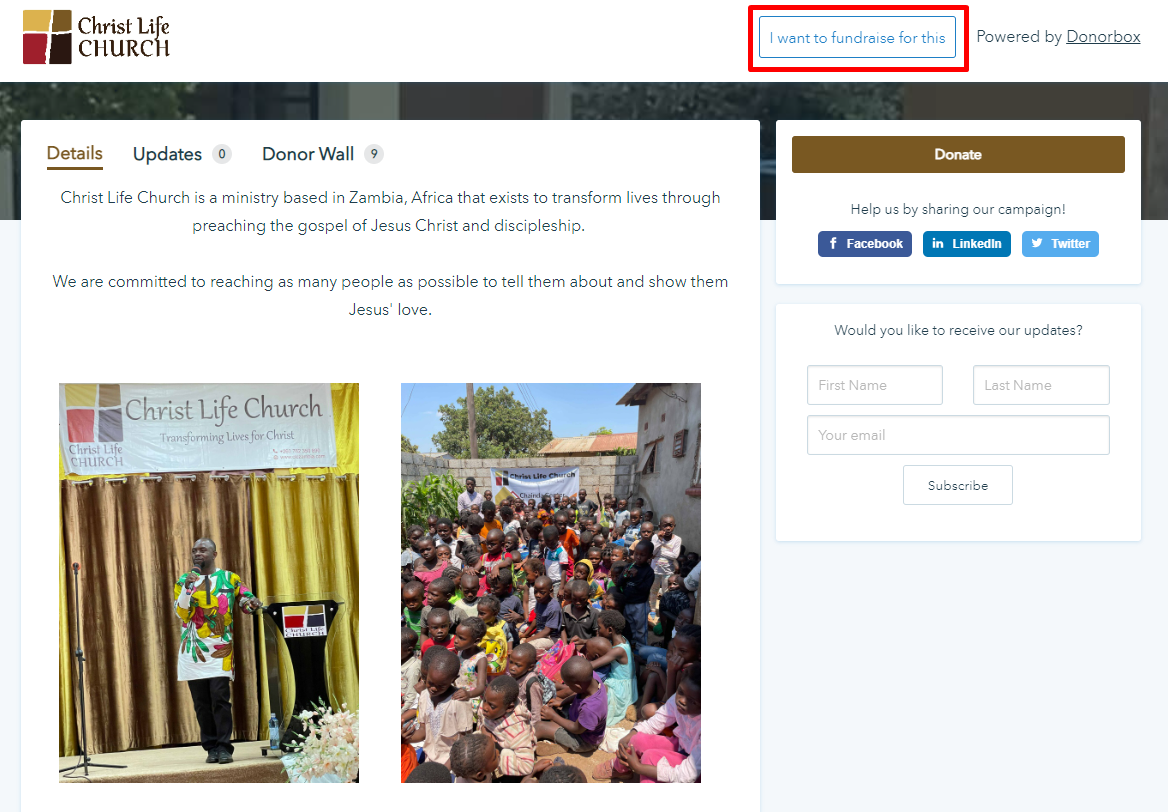
With Donorbox Peer-to-Peer, you can easily turn any fundraising campaign into a peer-to-peer parent campaign. Your church can invite members to fundraise right from the tool. The peer fundraising pages are created automatically. But your invitees can customize it further to include their inspiring stories before starting to fundraise for you. You also have the option to include a button on your parent campaign page that allows people to opt to fundraise for your church.
Check out how Christ Life Church utilizes this option and allows people to fundraise for the church.
8 Key Areas Where Your Church Can Use Peer-to-Peer Fundraising
You might be wondering – how can churches use peer-to-peer fundraising. Here are 8 areas where peer-to-peer can significantly increase your church’s fundraising.
1. Fundraising events
Your next church fundraising event can be even more successful with peer-to-peer fundraising enabled. This is a great way to get more donations – and even more attendance – for your event.
When you plan an event, you can have church members raise money on your behalf using Donorbox peer-to-peer fundraising pages. Donorbox automates most of the steps for you, so that would make things easier on your end and the fundraisers’ ends. You will need to help them with additional resources like the campaign story, images and videos, campaign updates, templates for social media posts or emails, etc. to make their fundraising more effective.
In addition to Donorbox Peer-to-Peer, you can also leverage our event ticketing system called Donorbox Events. It helps you sell tickets online with customizable event pages and ticketing forms. Learn more here.
2. Launching your church
Chances are, if you want to start a church, you already have some interested members in your community. That’s why launching your church is a great time to use peer-to-peer fundraising. People want to help you create a space for them to worship!
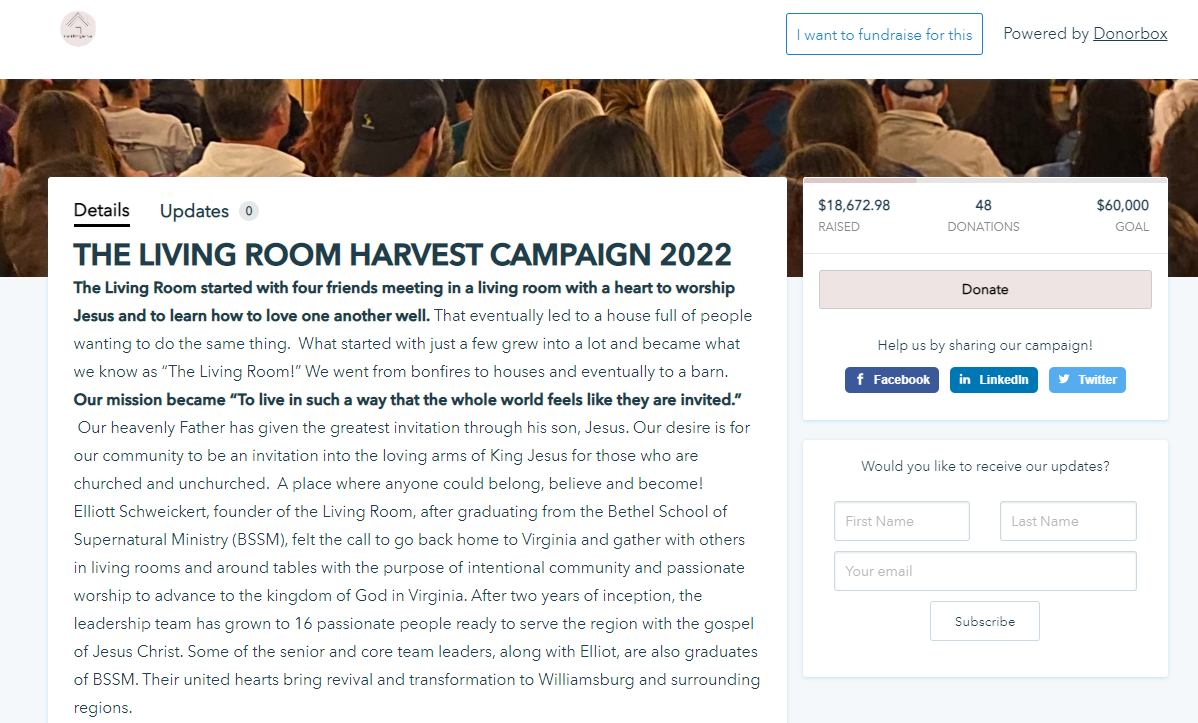
Check out how The Living Room activated peer-to-peer fundraising for the below crowdfunding campaign on Donorbox to raise over $18,000 toward administrative and staffing costs for their new church. They use a fundraising thermometer to show just how much money they’ve raised with just 48 donations!
Church capital campaigns typically involve fundraising for a new church building, whether you’re just starting your church or updating existing grounds.
This is a great time to give your supporters the opportunity to fundraise on your behalf. This will take your fundraising efforts further since your campaign will get exposed to an entirely new network.
4. End-of-year and holiday giving
The end of the year is a fantastic time to use peer-to-peer fundraising for a few reasons:
People are usually in the spirit of giving because of the holiday season.
Since it’s the end of the tax year, people might be more inclined to donate to increase their deductions.
Your supporters can request donations to their peer-to-peer campaigns in lieu of gifts from their friends and family.
If you need help preparing for the end of the year, check out How to Devise the Perfect Year-End Appeal. You can also share this with your fundraisers to help them make the perfect appeal to their networks while fundraising for your church.
This video gives you a glimpse into how Donorbox Peer-to-Peer can be the giving season game changer for your church –
Mission trips are the perfect opportunity for peer-to-peer fundraising since each participant should plan on fundraising to defray as much of their own expenses as possible.
Creating a main parent campaign is easy on Donorbox Peer-to-Peer. Then, simply invite all participants of your mission trip to fundraise with their name and email. Donorbox makes it simple for you, as shown below. Your invitees receive the emails and they easily sign up or log in to customize their fundraising pages. Raising the funds for your mission trips couldn’t be easier than this!
6. Helping church members
Peer-to-peer is a fantastic way to raise funds for members of your church who are in need. After all, the church is all about community – and community is about coming together when someone is struggling.
You can ask the rest of your members to fundraise to help the member in need. With a highly effective tool like Donorbox Peer-to-Peer that is being trusted by thousands of organizations, your members would easily get started. Plus, with tons of resources including guides, courses, and demo videos available on Donorbox, you and your fundraisers would never have to worry about a thing.
7. Church camp
Peer-to-peer works great for raising funds to support your church’s camp because it’s something that so clearly benefits the children who attend it.
You can ask parents of campers to create their own peer-to-peer campaigns to help support the costs of camp. This is a compelling ask for them because their friends and families get to directly support something that benefits the kids – and your church! And ever so often for those kids who can’t afford it.
8. Church grants
Church peer-to-peer fundraising can also help you do more for your community. Raising funds for grants to support a variety of projects makes your mission go even further – and uplifts others along the way.
4 Tips to Inspire and Help Your Congregants Fundraise for You
1. Choose the right peer-to-peer tool
You’ll want a fundraising platform that allows you to create a variety of campaigns – including peer-to-peer. This means all your fundraising will exist in one place, which makes managing your donors and funds much easier.
Donorbox is your one-stop shop for church fundraising. Thousands of churches trust us to handle their fundraising needs, from a simple online donation form to collecting digital tithes to peer-to-peer fundraising campaigns, and more.
Donorbox Peer-to-Peer offers a ton of benefits for your church, like –
Attractive, user-friendly, and customizable donation forms.
Fully customizable peer-to-peer fundraising pages for you and your supporters.
Choice to either allow anyone to fundraise on your behalf with a button added to your fundraising campaigns – or directly invite your key supporters.
Hands-free for you once your supporters are on board – simply see the donations appear in your account.
Collect donor information to steward ongoing relationships with new church donors – and even turn them into church members.
People are more willing to fundraise on your behalf if it’s as easy as possible. In fact, that’s one of the most important best practices for peer-to-peer.
Donorbox peer-to-peer “child” campaigns are so easy for your supporters. Because they simply receive instructions to get started straight to their email, whether you invite them or they sign up with a button on your campaign page.
The moment you invite them to fundraise, the tool automatically creates a basic peer fundraising page including a donation form. Your supporters can utilize this simple page or customize it further to include content and images shared by you.
3. Provide a fundraising toolkit
A fundraising toolkit includes everything someone might need to fundraise on your behalf, from social media guidelines and samples to thank-you letter language to FAQs to tips to customizing their fundraising pages, and more.
Providing your supporters with this empowers them to take control of their fundraising efforts and explain the value of this campaign to their network.
Donorbox Academy has a free course available for your church. You can use this for useful videos, campaign tutorials, and bonus resources to get your fundraisers started. Our Nonprofit Blog also includes a plethora of peer-to-peer fundraising resources to help you with ideas, best practices, tools, and more.
Finally, you should include our YouTube videos on peer-to-peer fundraising in your fundraising toolkit to help your fundraisers learn quickly. For example, the below video can be a great starting point for you and your church members.
Pro tip: Include your church history. This is helpful for both new and long-time church members since it reminds them of where your church came from and how you’ve grown. This is useful material they can use during their church peer-to-peer campaign.
4. Include an incentive
A fun way to encourage your supporters to more enthusiastically fundraise is to provide an incentive!
You can create an incentive for things like the most individual donations received or the highest amount raised.
Your incentive might be something large like a barbeque kit or a family getaway, or something as small as a t-shirt and recognition during your church service or event.
Donorbox Peer-to-Peer for Your Church Fundraising
Launching your first church peer-to-peer fundraising campaign on Donorbox only takes a few steps. We’ve written a quick step-by-step guide here for you to follow. However, for detailed information on each step, we suggest you refer to our dedicated guide here. We also have the below video to quickly walk you through the steps.
If you’re new to Donorbox, you can sign up here. Creating an account only takes a few minutes. If you’re an existing Donorbox user, please log in and continue.
Once you’re logged in, go to “Campaigns” on your Donorbox account and click “New Campaign”.
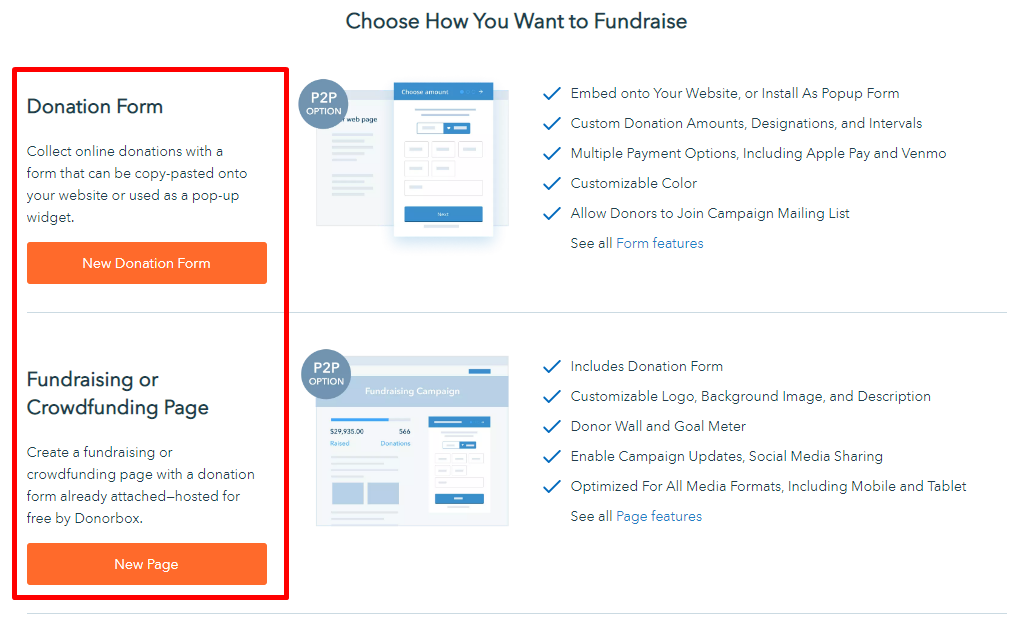
You can choose how you’d want to create a campaign on the next page that loads – through a donation form (a page gets created automatically that you can customize later on) or a fundraising page (including a donation form).
Once created, you can customize your campaign to match your church’s branding and needs. Follow this guide to learn the steps to customize your donation form and page.
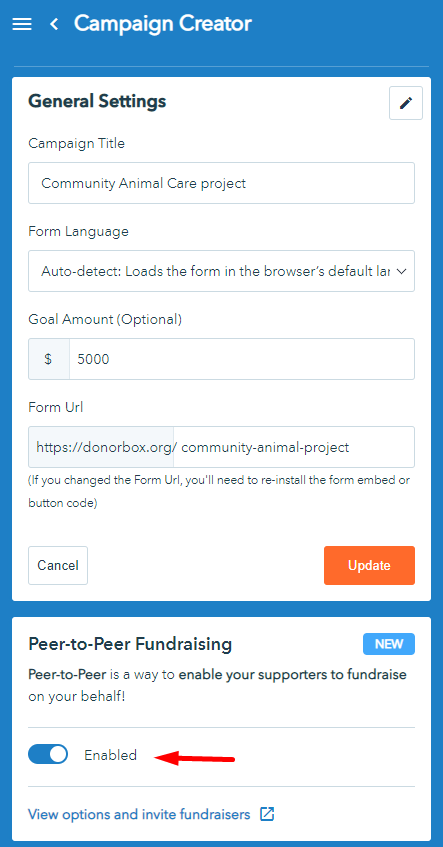
2. Toggle the switch to enable peer-to-peer
From your campaign creator, simply enable peer-to-peer by toggling a switch.
3. Invite fundraisers
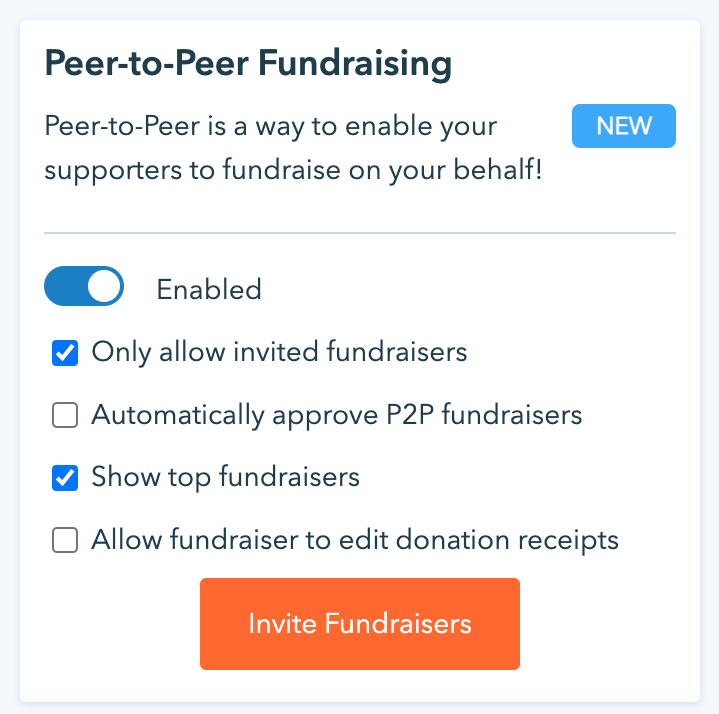
Click “view options and invite fundraisers” under the switch to customize your peer-to-peer functionality. This is where you can choose whether you’d like to allow anyone to fundraise on your behalf (via the button on your campaign page), or only those you invite.
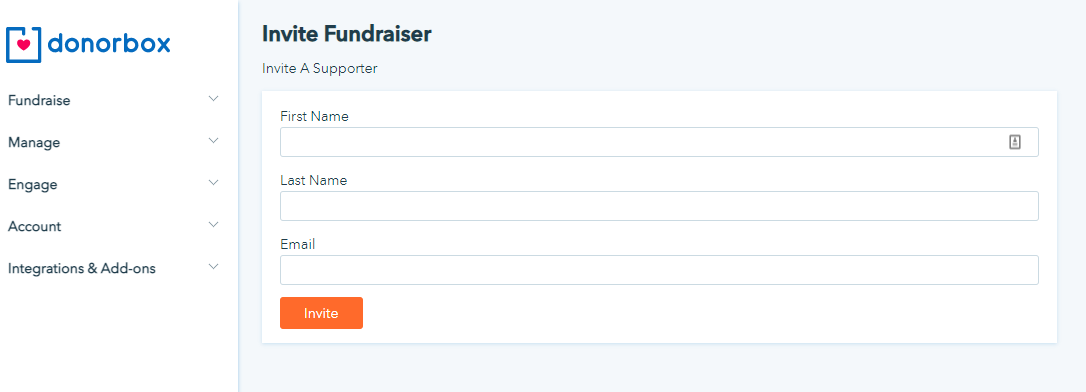
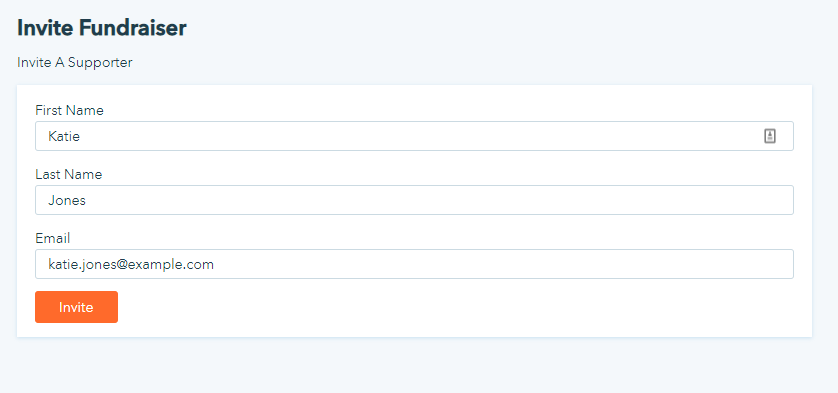
Click “invite fundraisers”. And you’ll be taken to the campaign dashboard. Now, scroll down and you’ll see the “Invite Fundraiser” button just over the Fundraisers list. Click it.
Fill out the below form to send an invite to your church members and volunteers.
This creates an initial fundraising page for your invitee. This helps your fundraisers get started more easily. In case customizing the page seems too much for them.
4. Fundraisers accept the invitation & sign up to fundraise
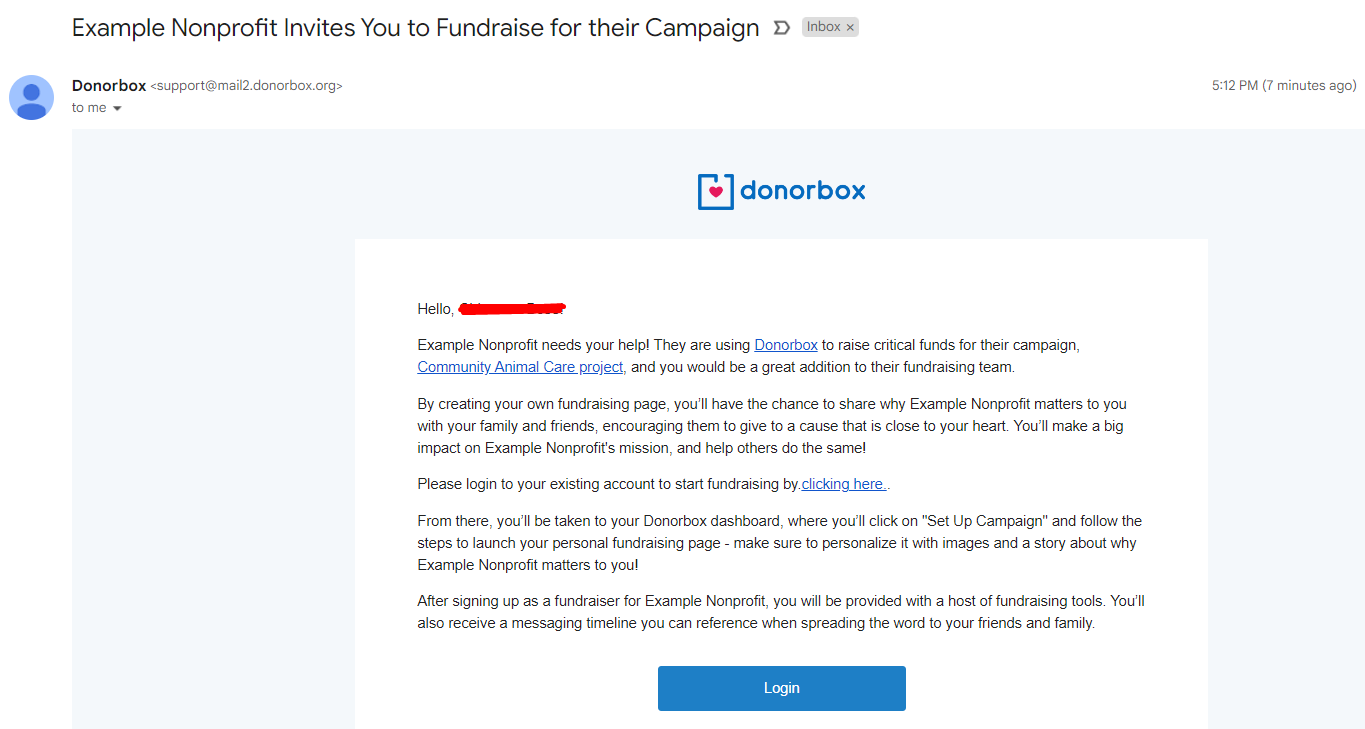
Your supporters will receive an email that looks like this –
As soon as they sign up or log in, they will be taken to the list of campaigns for which they have been invited to fundraise.
They can preview the basic fundraising page created for them. And then, proceed to customize it by clicking the “Edit” button. Follow this link to prepare your fundraisers to customize their fundraising page.
Pro tip: Encourage them to add pictures, stories, and other compelling content that tells the story of why they’re fundraising for your church.
Note: For fundraisers who directly opt to fundraise from the button added to your campaign, they will fill out a form with their names and email addresses. Donorbox will send them a similar email invite, as shown above, to sign up and customize their fundraising pages.
That’s it – you’re done! Your church members and volunteers are all set to launch their own peer-to-peer campaign pages and start collecting donations!
Conclusion
We know how important fundraising is for churches. It can provide you with fantastic tools to boost your revenue – and peer-to-peer is one of the most popular options for churches.
Letting others fundraise on your behalf takes some of the stress off of your church staff and volunteers while utilizing social proof to encourage even more donations. Plus, it’s a rewarding opportunity for your supporters to give back – and possibly connect their friends and family with your church.
Having the right tool for church peer-to-peer fundraising is so essential. You want to make things as easy as possible for your fundraiser. That’s why Donorbox Peer-to-Peer takes the stress out of peer-to-peer fundraising for churches.
Ready to get started? Sign up today. Learn about our other powerful fundraising tools on the website and read hundreds of useful articles on our Nonprofit Blog. Subscribe to our newsletter to receive a curated list of our best resources in your inbox every month.
Lindsey spent years wearing many hats in the nonprofit world. Whether she was helping arts nonprofits with their messaging and content, planning a fundraising gala, writing an NEA grant proposal, or running a membership program with over 400 members, she learned how to navigate – and appreciate! – the fast-paced world of fundraising. Now, she loves sharing those hard-earned lessons with the Donorbox community.
 Lindsey Baker Bower