A Double the Donation study found that 64% of surveyed nonprofits run year-end challenge match campaigns.
With the right giving challenge platform, your nonprofit can increase donor engagement, attract new supporters, and inspire greater generosity.
Below, I’ll share a list of the best nonprofit giving challenge platforms, including their features, drawbacks, pricing, and who they are best for.
What Are the Requirements for a Giving Challenge?
Typically, a giving challenge has the following requirements:
- A set amount of money must be raised to secure the challenge gift.
- Your fundraising goal must be met within a certain timeframe.
- Your giving challenge campaign must be accessible online and easily shareable.
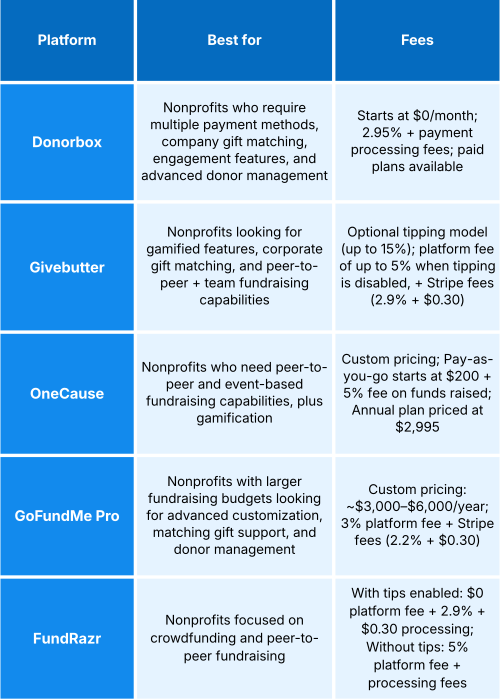
Below are five of the best fundraising platforms offering features that empower nonprofits like yours to raise more during giving challenges.
Top 5 Nonprofit Giving Challenge Platforms
1. Donorbox
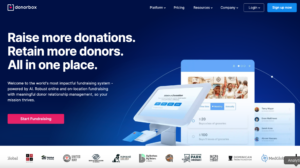
Donorbox is a fundraising platform offering a comprehensive suite of features, including conversion-optimized crowdfunding pages, branded donation forms that support recurring giving, and advanced donor management tools to cultivate lasting supporter relationships.
Ideal for:
- Nonprofits looking for a giving challenge platform that supports plenty of payment methods and offers various features to increase engagement.
- Nonprofits who need a fundraising platform that offers advanced donor management and reporting tools for improving future fundraising appeals and donor outreach.
Top features:
- Highly customizable donation forms and pages: Personalize your donation form and page to match your branding. Include visuals and text to help donors learn more about your nonprofit giving challenge.
- Personalized crowdfunding pages: Set up a customizable crowdfunding page that supporters can easily share on social media, increasing support for time-bound campaigns. Plus, post regular updates to keep supporters informed.
- Peer-to-peer fundraising: Allow your biggest supporters to fundraise for you using customizable peer-to-peer fundraising pages, multiplying your reach and fundraising potential.
- Goal meter for creating a sense of urgency: Motivate donors to give by publicly displaying how close you are to reaching your fundraising goal.
- Corporate gift matching: Let eligible donors ask their employer to match their donation using Donorbox’s Double the Donation integration, helping you raise even more.
- Repeat giving with QuickDonate™: Encourage donors to repeat their donations to your campaign in one click via the Donor Portal when you enable the QuickDonate feature, increasing funds for your cause.
- Donor wall for acknowledging supporters: Add a donor wall to your campaign to publicly recognize donors who opt in. This also doubles as social proof, motivating potential supporters to donate.
- Built-in CRM: Track every donation, segment based on real-time data, cultivate lasting donor relationships, generate reports, and streamline and automate workflows. Learn more and join the waitlist.
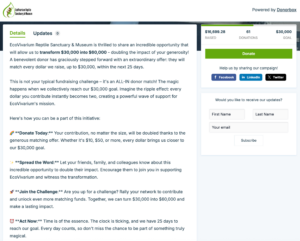
See how the EcoVivarium Reptile Sanctuary and Museum is collecting donations for their $30K Match Challenge using Donorbox Crowdfunding:
Raise More During Giving Challenges with Donorbox
Drawbacks:
- Donorbox doesn’t offer a countdown timer. However, nonprofits can include the campaign deadline within their fundraising story – as seen in the example above.
- The platform doesn’t offer gift-matching functionality for donors, whereby donors can match other supporters’ donations.
Pricing
Donorbox has three pricing plans:
- Standard Plan: $0 per month, with a platform fee of 2.95% for most features.
- Pro Plan: $150 per month, with reduced fees ranging from 1.75% to 2%. Includes additional benefits, such as advanced form customization and crypto and stock donations.
- Premium Plan: Create a customized plan to suit your unique fundraising requirements. Access 24/7 customer support, personalized coaching, and more – plus, reduced platform fees ranging from 1.6% to 2%.
Pricing excludes standard Stripe and PayPal processing fees. Ask donors to cover these fees so more of their donation goes toward your cause.
2. Givebutter
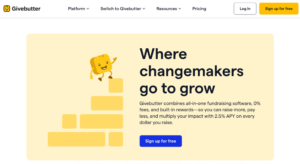
Givebutter is a fundraising platform that lets you create customizable campaign pages with highly engaging features, including an interactive supporter feed to amplify engagement.
Ideal for:
- Nonprofits looking for a giving challenge platform that offers gamified features to increase engagement, such as a countdown timer.
- Nonprofits who want a platform that supports peer-to-peer and team fundraising to encourage healthy competition among supporters.
Top features:
- Customizable fundraising pages: Create personalized campaigns with your fundraising story and visuals to inspire generosity.
- Crowdfunding functionality: Increase support for urgent projects and campaigns with a customizable crowdfunding page.
- Peer-to-peer and team fundraising: Reach more supporters and encourage friendly competition with peer-to-peer and team fundraisers.
- Countdown timer and goal bar: Create a sense of urgency for your giving challenge by including a countdown timer and goal bar.
- Interactive supporter feed: Build real-time engagement among supporters with a dynamic social feed for sharing updates, GIFs, and photos.
- Corporate gift matching: Givebutter integrates with Double the Donation, enabling qualifying donors to ask their employer to match their donation – and your nonprofit to double donations to your cause.
- Social sharing: Allow supporters to easily share your nonprofit giving challenge campaign on social media.
- Nonprofit CRM: Store valuable donor data, segment supporters for effective stewardship and outreach, create reports to inform future fundraising, and automate workflows.
Drawbacks:
- Givebutter has limited customization options for tailoring campaign pages. If your nonprofit requires more advanced customization, you may want to consider alternative platforms.
- The high optional donor tipping model of up to 15% on top of donations may be off-putting for some supporters and lead to tipping fatigue.
- Givebutter currently only accepts donations made via cards, digital wallets, DAFs, and ACH. This may cause certain donors to abandon their gift when realizing their preferred payment method isn’t supported.
Pricing:
Givebutter relies on an optional tipping model that requests tips of up to 15% from donors. If you disable optional tipping, your nonprofit is charged a platform fee of up to 5% for each donation received. This excludes standard Stripe processing fees of 2.9% + $0.30.
3. OneCause
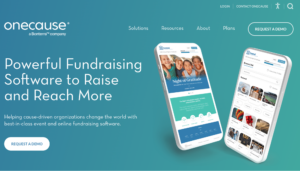
OneCause is a great giving challenge platform if your nonprofit requires strong event and peer-to-peer fundraising tools that include rewards and gamification.
Ideal for:
- Nonprofits who prefer to fundraise using various peer-to-peer fundraising models, as well as through events.
- Nonprofits who rely on gamified features to increase engagement during online campaigns.
Top features:
- Customizable fundraising pages: Create tailored fundraising pages with custom content blocks to include visuals, text, and resources.
- Various peer-to-peer fundraising models: Encourage supporters to fundraise on your behalf using personalized fundraising pages. Choose from runs, walks, and rides, fitness challenges, and dance-a-thons.
- Gamified features for heightened engagement: Inspire friendly competition and engagement with features like leaderboards, badges, and milestones.
- Goal meter for creating a sense of urgency: Publicly display your fundraising goal to motivate supporters to donate to your cause.
- Real-time updates: Share campaign progress in real time to celebrate impact and drive action.
- Social sharing features: Encourage supporters to share your nonprofit’s giving challenge with dynamic prompts, rewards, and public recognition.
- Company donation matching: Let qualifying donors have their companies match their donation by integrating Amply or Double the Donation, increasing support for your cause.
- Donor management tools: OneCause offers donor management tools for analyzing donor and donation information, configuring post-event receipts, and reviewing donor activity across events.
Drawbacks:
- The breadth of features may come with a steep learning curve for some users.
- OneCause doesn’t fully disclose its pricing, which can frustrate nonprofits who prefer to review all pricing options before speaking to a salesperson.
- OneCause only supports cards, limited digital wallets, ACH, and DAF. Minimal payment options can increase donor drop-off.
Pricing:
As I mentioned, OneCause is not fully transparent about all its pricing plans, so you’ll need to talk to sales to learn more.
According to their website, they offer a Pay-as-You-Go package starting at $200 with a maximum cap. A 5% pay later fee is also deducted from all funds raised. Alternatively, they offer an annual subscription for their Professional Auction & Event package, which costs $2,995.
For exact pricing based on your fundraising needs, request a demo for a custom quote.
4. GoFundMe Pro
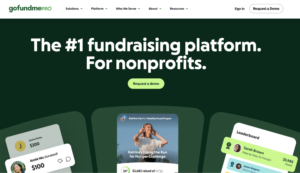
GoFundMe Pro is a platform specifically designed for nonprofit fundraising. It offers highly customizable fundraising pages and forms to increase conversion and engagement.
Ideal for:
- Nonprofits looking for a giving challenge platform offering advanced customization options for fundraising pages.
- Larger nonprofits with bigger fundraising budgets who don’t mind committing to annual pricing plans.
Top features:
- Customizable campaign pages: Tailor your fundraising pages to match your brand. Customize templates with visuals and text to share your story and connect with supporters.
- AI-powered ask amounts: Include personalized donation amounts, frequencies, and nudges on your donation form to maximize conversion rates.
- Personalized crowdfunding pages: Increase campaign momentum and engagement with customizable crowdfunding pages that include visuals, text, and progress bars.
- Peer-to-peer fundraising: Allow supporters to fundraise for you with personalized peer-to-peer fundraising pages, maximizing your reach and donation potential.
- Live leaderboards for increased engagement: Encourage friendly competition with live leaderboards and nudges.
- Custom impact tiles: Demonstrate the impact of donations with custom impact tiles.
- Matching gift opportunities for donors: Let supporters match other donors’ gifts by showcasing donation matching opportunities. Plus, highlight the impact of gifts in your progress bar and activity feed.
- Employer donation matching: Integrate Amply or Double the Donation so eligible donors can ask their employer to match their donation, increasing funds for your mission.
- Social sharing buttons: Encourage supporters to quickly share your campaign across social media, increasing your outreach.
- Donor management and reporting: Use advanced filters, analytics, and custom reports to analyze campaign performance and improve donor stewardship.
Drawbacks:
- GoFundMe Pro’s custom annual pricing packages range from $3,000 to $6,000, which may be too expensive for small- to medium-sized nonprofits with smaller budgets. It may also be restrictive for nonprofits who prefer month-to-month pricing.
- Some users may find the platform comes with a big learning curve and require training to fully utilize the benefits of all features.
- GoFundMe Pro currently only supports payments made via cards, ACH, and digital wallets. Plus, ACH and digital wallets are only available if nonprofits set up GoFundMe Pay as a payment solution. Limited payment methods can lead to donor drop-off and reduced impact over time.
Pricing:
As I mentioned before, GoFundMe Pro offers custom pricing ranging from $3,000 to $6,000. Pricing depends on your unique fundraising needs, and excludes the 3% platform fee and standard Stripe payment processing fees of 2.2% + $0.30 per transaction.
5. FundRazr
FundRazr offers helpful fundraising features and tools to set up giving challenges through crowdfunding and peer-to-peer fundraising pages.
Ideal for:
- Nonprofits looking for a giving challenge platform specifically focused on crowdfunding and peer-to-peer fundraising.
Top features:
- Branded crowdfunding pages: Create a customized crowdfunding page using prebuilt templates and include visuals and text to appeal to supporters.
- Various crowdfunding models supported: Fundraise through microprojects, peer-to-peer fundraising, and other supported models that align with your fundraising strategy.
- Peer-to-peer and team fundraising: Encourage supporters to fundraise for you using their own customizable peer-to-peer fundraising pages. Plus, encourage friendly competition with team fundraising.
- Milestones to increase engagement: Keep your community engaged with automatic milestones that recognize donor accomplishments that can be shared on social media and within your campaign feed, such as “first contribution.”
- Sponsor matching: Promote sponsors who agree to match donations on your campaign, encouraging donors to contribute and highlighting the impact of their gifts.
- Social sharing tools: Encourage supporters to share your campaign across various social media platforms and expand your reach.
- Wishlists and perks functionality: Ask supporters to donate toward specific items in need, and incentivize them based on various giving levels.
Drawbacks:
- FundRazr doesn’t support company donation matching, which can reduce your donation potential.
- The platform currently only supports PayPal, Google Pay, Apple Pay, and debit/credit cards. This can turn away donors who prefer to give through other payment methods, reducing your fundraising potential.
- FundRazr operates on an optional donor tipping model, which can lead to donor tipping fatigue. When disabled, it charges a 5% fee per donation for campaign pages, excluding payment processing fees.
- While FundRazr offers basic donor management and reporting tools, nonprofits who require more advanced donor management tools may need to consider alternative platforms.
Pricing:
FundRazr charges a $0 platform fee when optional donor tips are enabled, plus a 2.9% + $0.30 processing fee per transaction.
When optional tips are disabled, FundRazr charges a 5% platform fee per donation for campaign pages, along with payment processing fees.
What to Look for in a Giving Challenge Platform
Here are the features and tools to prioritize when deciding on the right giving challenge platform for your nonprofit:
- Matching gift support: Whether it’s company donation matching, donor matching support, or both, your chosen platform should make it easy for supporters and/or companies to match donations.
- Clear progress tracking: Look for a platform that offers goal meters or countdown timers to increase transparency and spark a sense of urgency that encourages supporters to give.
- Multiple payment methods: Offering as many payment methods as possible ensures you appeal to various donors’ giving preferences and provide a frictionless donation experience.
- Crowdfunding and peer-to-peer fundraising: These two fundraising methods are essential for increasing engagement and campaign reach.
- Donor walls and leaderboards: These features act as social proof that inspires others to support your campaign, while also allowing you to publicly acknowledge donors.
- Reporting and donor management: Being able to effectively segment donors is crucial for personalized outreach and stewardship during and after your campaign.
Over to You
Giving challenges are a fantastic way to spark engagement and bring in more revenue for your mission. Choose a platform that offers features and tools like crowdfunding, peer-to-peer, and donation matching to accelerate engagement and raise more.
Interested in giving Donorbox a try? Sign up for free today and set up your nonprofit giving challenge in minutes!
For more comparison articles and fundraising tips, visit the Nonprofit Blog. Sign up for the monthly newsletter to receive a curated selection of resources sent straight to your inbox.

Jamy-Lee Holt
Jamy-Lee has over 7 years of experience in copywriting and content marketing. With experience teaching in underserved communities and volunteering for animal rescue organizations, she has a first-hand understanding of the challenges faced by mission-driven organizations. She now uses her passion for writing to share practical insights that help nonprofits fulfill their missions.
![The Best Nonprofit Giving Challenge Platforms [+ Top Features You Need to Succeed]](https://donorbox.org/nonprofit-blog/wp-content/uploads/2026/04/Best-Nonprofit-Giving-Challenge-Platforms.png.webp)
 Join the fundraising movement!