How to Raise More With the Donorbox OmniGive™ Donation Form
Meet the Donorbox OmniGive™ Donation Form, our smartest, most seamless form yet. Find out how this form helps you raise more.
Updated on

Meet the Donorbox OmniGive™ Donation Form, our smartest, most seamless form yet. Find out how this form helps you raise more.
 Join the fundraising movement! Join the fundraising movement!
 Add us as a preferred source on Google
If you’re already fundraising online (or just getting started), you know how much your donation form matters. A clunky, outdated form can turn donors away. A clean, fast, flexible one? That’s how you keep them giving.
Enter the Donorbox OmniGive™ Donation Form – our latest and greatest form, built to make giving easier for your donors and more insightful for your nonprofit.
In this blog, I’ll break down exactly what the OmniGive donation form can do, what you need to know before setting it up, and how to get the most out of it.
The OmniGive donation form is the default donation form across Donorbox – designed to help your nonprofit offer a faster, more modern giving experience.
It’s optimized for conversion, supports more payment methods than ever before, and looks great whether it’s embedded on your site or hosted on Donorbox.
See how Black Girls Code uses the OmniGive donation form on their Donorbox-hosted peer-to-peer campaign:
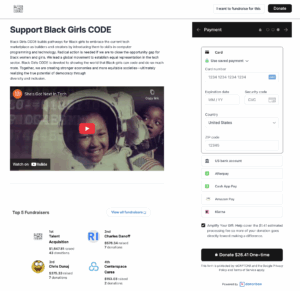
Get Started With the Donorbox OmniGive Donation Form
The form does more than just look good – it’s made to help you bring in more donations. From smarter payment flows to a more intuitive donor experience, every feature is designed to reduce friction, build trust, and make giving feel easy.
Let’s look at how each piece of the form contributes to better fundraising results. I’ll also drop in some tips along the way to help you get the most out of each one.
With both Stripe and PayPal connected, the OmniGive donation form supports 22+ payment methods, including:
The form is also fully future-ready, supporting cryptocurrency and stock donations via our integration with The Giving Block. This gives your donors even more flexibility, and equips your nonprofit with new ways to reach high-value supporters who prefer nontraditional giving options.
Important note: Payment method availability is subject to Stripe’s terms and conditions. If you have any questions about certain payment options and their availability in your country/region, please contact Stripe for more information.
The OmniGive donation form offers advanced customization, so your donation form feels like part of your brand, not just a generic checkout box.

Advanced customization options are only available on Donorbox Pro and Premium plans.
Top tip: When customizing your form, stick to bold, high-contrast colors for buttons and fonts. Clear, readable design helps donors stay focused and increases completion rates – especially on mobile.
The form uses a streamlined, accordion-style layout that groups payment methods into expandable sections. This helps reduce visual clutter and lets donors easily find the method that works best for them.

The form is also smart about what it shows. Payment options are localized and dynamically displayed based on your donor’s device, location, currency, and more.
For example, a donor in the U.S. on mobile might see Apple Pay or Cash App Pay, while someone in Europe might see SEPA Direct Debit or Multibanco.
The OmniGive donation form also supports donations in 53 currencies and 15 languages, making it easier to accept international gifts without adding friction at checkout.
Pro tip: To unlock the full experience, make sure both Stripe and PayPal are connected in your Donorbox account. Stripe enables wallets and global/local methods, while PayPal gives access to PayPal and Venmo.
UltraSwift™ Pay is our one-click giving experience for donors using digital wallets. When enabled, it can significantly speed up the donation process, especially for mobile users!
Instead of manually entering their name, email, and card details, donors can simply tap once to donate using Apple Pay, Google Pay, or other connected wallets.
On the form, donors will be given the option to “Pay with” the wallets available to them, as shown in the example below:

You’ll see it referred to as “UltraSwift Pay™” in your Donorbox dashboard.
Tip: Enable UltraSwift to help reduce drop-off and boost conversion, especially for repeat or mobile donors looking for a fast, fuss-free experience.
UltraSwift won’t appear if GDPR compliance is enabled, employment info is collected, or you’ve added custom questions. In addition, UltraSwift currently doesn’t support Donor Covers Fees or Recurring Upsell.
As you probably already know, recurring gifts are the foundation of sustainable fundraising! The Donorbox OmniGive Donation Form makes collecting them easy. Add up to four recurring intervals from the seven options available:
Including different intervals on your form gives donors more control over how often they give. Plus, recurring donations are supported across all major payment methods on the OmniGive donation form – including cards, digital wallets, crypto, and bank transfers.
Take a look at how the SimiSleighs Foundation offers three recurring donation intervals on their Donorbox form, indicating “Monthly” as their preferred interval with a tiny heart icon:
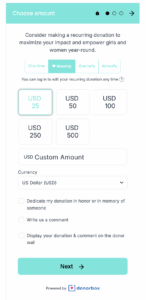
Pro tip: Follow the SimiSleighs Foundation’s example and add a short, inviting message above your donation intervals to encourage recurring gifts. A personal touch like that goes a long way!
The form was built to blend seamlessly into your existing website. The embed code automatically adjusts to fit any layout or screen size, so you don’t have to fiddle with alignment or mobile settings.
The form looks just as polished on a smartphone as it does on a desktop!
The loading visual adds a small but important touch. When the form is loading, your donors see a progress indication rather than a blank screen. Here’s what it looks like:

It’s a small reassurance that can make a big difference for people with slower connections, helping them stay engaged instead of dropping off.
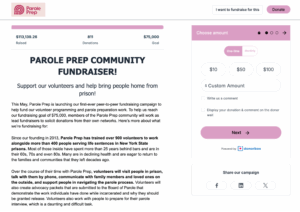
If you’d rather not embed your form on your site, Donorbox also provides hosted campaign pages that display beautifully and retain all the same functionality.
See how Parole Prep’s branded Donorbox OmniGive Donation Form appears on their hosted page:
The OmniGive donation form was designed to minimize clicks, remove distractions, and guide your supporters smoothly from intent to donation.
See how quick and intuitive the giving experience really is:

The Donorbox OmniGive Donation Form is designed to make donations effortless – for both donors and organizations. It’s faster, smarter, and packed with thoughtful features to help you raise more, based on real feedback from nonprofits like yours.
Whether you’re running a small campaign or scaling a national fundraising effort, using the OmniGive donation form to its full potential can turn your donation experience into one that donors remember (and return to).
Already using Donorbox? Log in and explore your Donorbox OmniGive Donation Form. If you’re new to Donorbox, sign up for free and create your form today.


Fern is a journalist-turned-editor with 8 years of writing experience, now using that skill set to help nonprofits share their stories and connect with donors. Along with her editorial work, Fern volunteers with animal welfare organizations and has spent years fostering and rehabilitating rescue parrots.
 Join the fundraising movement! Join the fundraising movement!
Subscribe to our e-newsletter to receive the latest blogs, news, and more in your inbox.