See for yourself how easy fundraising can be with Donorbox.Watch the Demo now
Donorbox Live™ – Elevating Live & In-Person Fundraising with Swift Cashless Donations
The Donorbox Live™ app turns your tablet or smartphone into a giving kiosk so you can accept swift, cashless donations – anywhere and anytime. Learn more about Donorbox Live in this article.
The number of global digital wallet users is expected to reach 5.2 billion by 2026, with 63% of donors already preferring to donate online. It’s no surprise churches, museums, masjids, art galleries, and other nonprofit organizations that often get visitors at their locations are seeing fewer in-person cash donations.
What if you could easily set up a giving kiosk at your location or fundraising events that collects cashless donations seamlessly, anywhere and anytime? That’s where the Donorbox Live™ app comes in!
Keep reading to learn how Donorbox Live™ Kiosk and Donorbox Live™ Mobile can help you elevate in-person giving.
What is Donorbox Live?
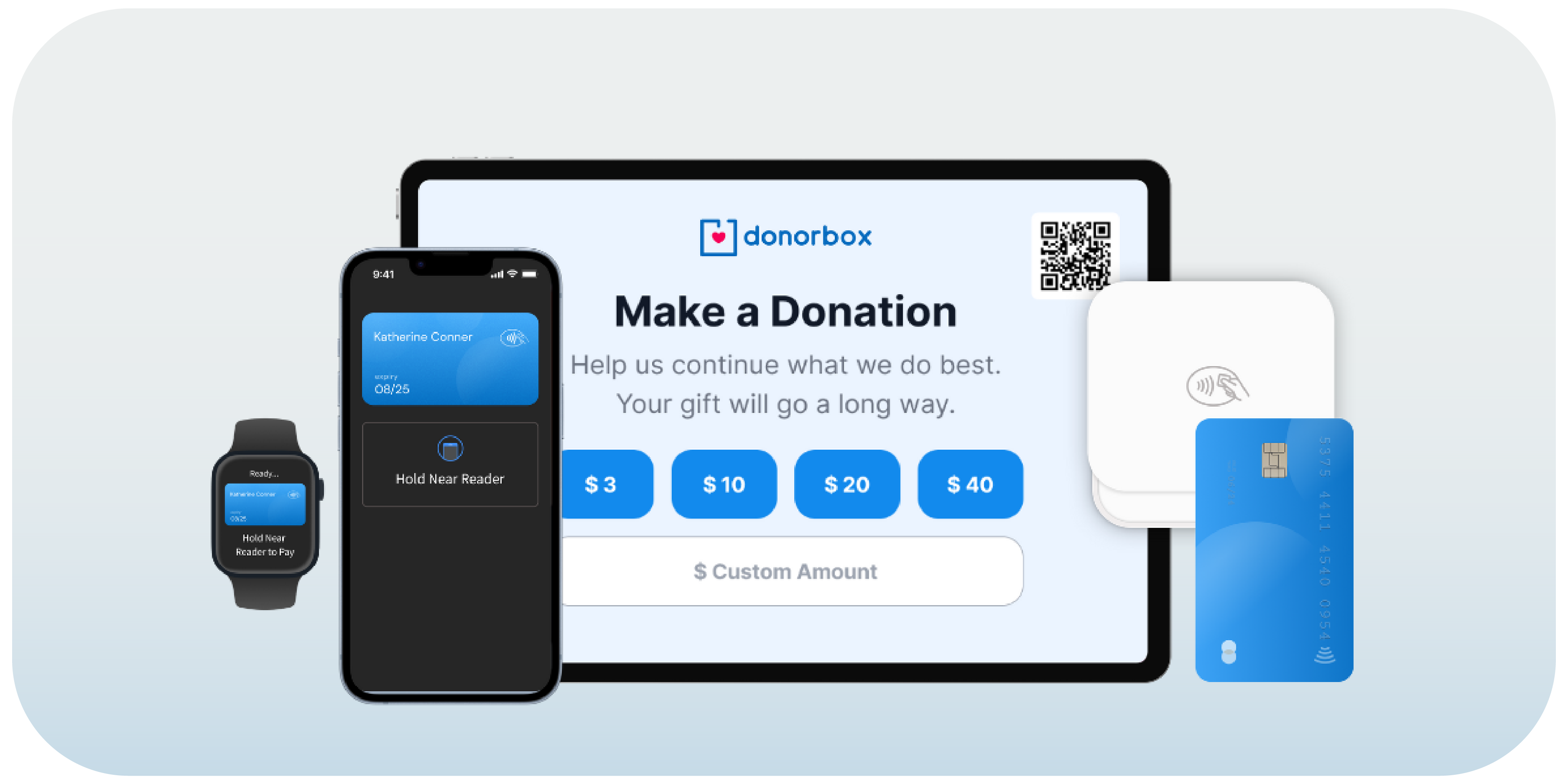
The Donorbox Live app turns your tablet or smartphone into a giving kiosk, enabling you to accept swift cashless donations made via cards and digital wallets.
Donorbox Live Kiosk allows you to transform your tablet into a donation kiosk when pairing it with a card reader device.
Plus, Donorbox Live Mobile is our tap-to-donate feature that lets you collect donations using your iPhone or Android smartphone’s built-in Near Field Communication (NFC) technology – no card reader required.
Organizations using Donorbox Live along with online fundraising tools see an average increase in donations of over 35%.
Invite donors visiting your location or attending your in-person events to make swift, secure donations with credit/debit cards and digital wallets via smartphones and smartwatches.
Plus, give them the option to cover the transaction fees so that more of their donation goes towards your mission.
The Donorbox Live add-on is priced at $80/month for the first device (Standard and Pro users). Premium users pay a reduced fee of $50/month for the first device. You’ll pay an additional $15/month for each subsequent device you use.
Activate the add-on for the month of your event, then turn it off when you’re done – or keep it rolling all year long for seamless, cashless donations.
Donorbox Live is packed with exciting features that take your in-person fundraising to the next level. Here are just a few benefits:
Streamline cashless donations: Allow donors to give securely using debit cards, credit cards, or digital wallets.
Enable sustainable giving: Recurring donations enable financial stability and predictable revenue for your organization. Turn your one-time donors into recurring supporters by adding up to four recurring giving intervals to your campaign and allowing donors to sign up on the spot!
Personalize the giving experience: Easily brand your kiosk with your logo, colors, and a customized message — aligning the giving experience with your mission.
Designate donations: Let your donor choose exactly where their gift should go – whether it’s for a specific program or an ongoing campaign.
Collect U.K. Gift Aid: U.K. organizations can give donors the option to indicate whether their donation is eligible for U.K. Gift Aid. This means you’ll receive an extra 25% on top of every qualifying donation to your cause.
Make giving inclusive: Donorbox Live is available in 17 languages. This allows you to welcome a wider range of supporters to give to your cause!
Collect donor info: Capture optional donor contact information at checkout to build deeper relationships with your donors long after your campaign ends.
Gain deeper donor insights: Add up to three custom questions to collect valuable donor info that helps you understand your donors better.
Accept anonymous donations: Protect donor privacy by enabling donors to give anonymously and discreetly, without providing their name and contact information. This also distinguishes intentional anonymous donations from donations where details were skipped, keeping your data clean and accurate.
Boost engagement and retention: Invite donors to subscribe to your mailing list during checkout — allowing you to keep them informed, inspired, and involved in your mission.
Enable faster, frictionless repeat giving while maintaining clean donor records: Returning donors can give by card without re-entering their contact details. Donors only need to provide their personal details once. After that, they simply tap their card, and their information is automatically filled in and linked to their profile (note that the Prefill Donor Information feature only works when name and email fields are set as optional).
Gather donation insights instantly: Donations flow directly to your Donorbox account, giving you real-time insights and data you can use to optimize your next fundraising event.
Never miss a donation: Worried your device might lose internet connectivity? No problem! Offline Auto-Sync Donations automatically syncs donations to the backend when you reconnect to the internet, ensuring no gift is lost. Note that this feature excludes recurring donations and is only available when using a card reader.
Let’s take a look at everything you’ll need to turn Donorbox Live into a giving kiosk – whether you’ll be using a tablet or collecting donations from your smartphone.
What You Need for Donorbox Live
Everything you’ll need to turn our powerful app into a giving kiosk is easily accessible – and you may already have some of these tools on hand!
To order your card reader, visit this page for the Stripe M2 and this page for the WisePad 3. Note that you must have an active Stripe account and log in to view and order a card reader.
Looking for an all-in-one package with everything you need to start fundraising? Check out ourpackages to find one that fits your needs.
Setting Up Your Giving Kiosk
Getting started takes just a few steps:
Activate the Donorbox Live add-on on your Donorbox account. Learn more.
Create and customize an in-person campaign. Learn more.
More of a visual learner? Watch this short video tutorial to see the setup process for kiosk mode in action!
Tap Into the Potential of On-the-Go Giving
44% of millennials prefer to donate via smartphones rather than physical cash. That’s why nonprofits need to stay ahead of the curve and provide supporters with new and convenient ways to donate!
Donorbox Live Mobile makes in-person fundraising easier than ever before. Accept cashless donations to your organization instantly when downloading the Donorbox Live app on your NFC-supported smartphone – no additional hardware or card readers required!
Donors can give to your cause using credit/debit cards and NFC-based mobile wallets (Apple Pay, Google Pay, and Samsung Pay). PIN entry is also supported. It’s fast and secure, enabling effortless, on-the-go giving.
Use Cases for Donorbox Live Mobile
The potential to fundraise in person is endless with Donorbox Live Mobile. Here are some ideal scenarios where you can incorporate this tap-to-donate feature in your in-person fundraising strategy:
Cashless, in-person fundraising is that easy! Our goal at Donorbox is to empower you to raise more with less effort, so you can focus on helping those in need.
Here are some answers to frequently asked questions about Donorbox Live.
FAQs about Donorbox Live Mobile:
1. What do I need to set up Donorbox Live Mobile?
You’ll need an NFC-enabled Android smartphone or iPhone, an active Donorbox account and Stripe account, and mobile data connectivity. There is no additional hardware or card reader required.
2. Which payment methods does Donorbox Live Mobile for smartphones support?
Donorbox Live Mobile on smartphones supports Visa, Mastercard, and American Express contactless cards, as well as NFC-based mobile wallets (Apple Pay, Google Pay, and Samsung Pay). PIN entry is also supported.
3. Which Android and iOS versions are required to use the tap to donate feature?
Your Android smartphone must be running Android version 13 or higher to use Donorbox Live Mobile. Your device should not be running a beta version of Android. For iPhones, you’ll need iOS 16.4 or later. The latest iOS version is advised for the best performance.
FAQs about Donorbox Live Kiosk:
1. What do I need to set up Donorbox Live Kiosk?
You’ll need a tablet (Android 8 or later, or iOS 13 or later) with the Donorbox Live™ app downloaded, a Stripe M2 card reader (inside the U.S.) or WisePad 3 card reader (elsewhere), and a stable internet connection.
Alternatively, download the app on your Android smartphone or iPhone to fundraise without further equipment needed.
2. Which currencies does Donorbox Live Kiosk support?
Donations made through Donorbox Live Kiosk can be made in the following currencies: USD, CAD, GBP, AUD, EUR, CZK, DKK, MYR, NZD, NOK, PLN, SGD, SEK, CHF.
3. How much does Donorbox Live Kiosk cost?
The Donorbox Live Kiosk add-on costs $80/month and can be used on one device. Additional devices cost $15/month each.
4. How do I set up and customize an In-Person Campaign on Donorbox?
View our step-by-step guide to set up and personalize your in-person campaign.
For more helpful FAQs related to Donorbox Live, click here.
Chirasree Bose is the Content Editor at Donorbox. Apart from editing and writing, what holds her interest the most is reading books. Chirasree loves to explore the world of fiction and has authored some books herself. Connect with her on Facebook, Instagram, LinkedIn, and Twitter.

 Join the fundraising movement!