A Nonprofit’s Guide to Livestreaming, Start to Finish
Livestreaming gives supporters a front-row seat to your work, wherever they are. Learn how to make your nonprofit’s livestream one worth tuning in for.
Published on

Livestreaming gives supporters a front-row seat to your work, wherever they are. Learn how to make your nonprofit’s livestream one worth tuning in for.
 Join the fundraising movement! Join the fundraising movement!
Your biggest donor moved out of state years ago and still gives every year, though she’s never actually seen the building her gift helped renovate. A shift worker on your volunteer list catches your events from her phone during a break, when she catches them at all.
Livestreaming is how you reach both of them: broadcasting live video to people who simply aren’t in the room.
That access, letting donors and volunteers see firsthand what their support actually does, is the real value here. And once you start thinking about livestreaming that way, it stops being one gala a year and starts being a tool you reach for whenever it’s useful.
Here’s what that actually looks like, from your first format decision to what to do after you hit stop.
Ask ten nonprofit staffers what a livestream is for and you’ll get ten different answers – and they’re all right. Which one you run depends entirely on what you’re trying to do that week.
Here are a few to choose from:
Before you touch a camera, decide what this specific stream needs to do: raise money, build trust, say thank you, recruit volunteers. One goal per stream.
Trying to do all four at once usually means doing none of them well, since your script, graphics, and camera setup all change depending on the goal.
Bonus resource: Planning a full virtual fundraising event, ticketing and all? Discover more virtual fundraising ideas in this dedicated blog post.
Here’s the part that stops most nonprofits before they start: they picture a livestream and think cameras, cables, a control room, someone’s cousin who does video.
You don’t need any of that.
Viewers will forgive a shaky shot or a plain background, but the second they can’t hear you clearly, they’re gone.
An inexpensive clip-on mic will do more for your production quality than any camera upgrade you could buy.
A few concrete starting points:
(We go a bit deeper on mic and audio setups on the Switcher blog, if you want to go further down that particular rabbit hole).
A single static shot works fine for a quick update. But if you’re running an actual event, switching between a wide shot, a close-up on a speaker, and a shot of the room or the cause makes the stream feel produced instead of accidental.
This is the one place a dedicated app earns its keep. Platforms like Switcher run on the iPhones, iPads, and Macs you already have and turn every camera and device you have into a multicamera setup.
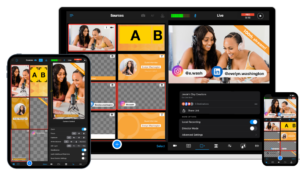
You’re not locked into an all-Apple lineup either: Android phones and tablets connect as wireless cameras, and so do HDMI and NDI cameras. It’ll take up to nine sources at once if you’re ever running something that big, though most nonprofit streams need two or three.
Here are three different setups based on budget:
If you can, test the internet at the actual filming location.
A church basement or a job site three counties over might not have the bandwidth you hope it does, and that’s a much better thing to discover during a test run than thirty seconds before you go live.
Two quick housekeeping items worth deciding while you’re still planning:
It depends on what you’re optimizing for.
There’s a way to sidestep that tradeoff altogether, though: multistreaming.
Switcher pushes the same live feed to up to 20 different platforms at the same time – Facebook, Instagram, YouTube, LinkedIn, and more – so you’re not stuck picking which of your donors you reach this time.
It’s about as close as you get to having your cake and eating it too: run the stream once, and the donor who lives on Facebook and the one who only checks YouTube both catch it.
None of that platform comparison matters if someone can’t actually give once they’re watching.
A stream is only as useful as the path from watching to donating, and that path needs to be short: your Donorbox donation link in the chat, a QR code pointing to it on screen, whatever gets someone from “I’m moved by this” to “I just gave” in one tap.
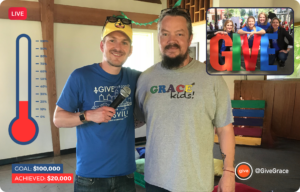
Platforms like Switcher let you build that as a custom CTA graphic directly into the feed, so it’s visible on-screen no matter which platform someone’s watching from.
Whichever platform (or platforms) you choose, ask yourself one question: can someone give without leaving the stream to go hunt for a form?
The best streaming platform is the one where giving takes one tap. Five taps, and you’ve lost the donor.
A quick behind-the-scenes update doesn’t need the same setup as your biggest giving day of the year, and it’s fine to use a different platform for each.
General event marketing (email blasts, save-the-dates, social posts) is well-trodden ground, so I won’t rehash it here.
What’s specific to a livestream is timing:
A few avoidable ones, so you don’t have to learn them live in front of your donors:
Final tip: Run through this list the morning of, not the week before. “We already have a plan for that” feels a lot more solid four days out than it does thirty minutes before you’re supposed to go live.
You’re live now, and the job changes. Getting people to show up was about timing and reminders; keeping them there is about something closer to hosting.
A livestream succeeds or fails on the same thing a good conversation does: whether the other person feels heard.
None of this takes performance training. It takes remembering that there’s an actual person on the other end of the connection and speaking to them directly.
Most of a livestream’s value shows up after you hit “end stream.”
Pull clips from the recording almost immediately: the moment someone teared up talking about your mission, the funniest ten seconds from your Q&A, the exact line where you made your ask.
Those clips become social posts, email content, and next year’s promo material, and they cost nothing extra since you already filmed them.
Then look at what actually happened. A stream can feel great in the room and still flop everywhere that matters. A few numbers are worth tracking every time:
Skip the vanity metrics. A big view count means nothing if nobody stayed past the intro or gave a dollar. Track the handful of numbers that tell you whether the stream did its job, and use that to make the next one better.
Don’t forget the people who didn’t tune in live, either. A short follow-up email with a clip and a link to the full replay reaches everyone who meant to watch and got pulled away, and it gives them a second (and much lower-pressure) chance to give.
Build livestreaming into your regular rhythm, not just a once-a-year event: a monthly update here, a quick Q&A there, whatever keeps you showing up between the big moments. It pays off well past whatever single stream you’re planning right now.
And when viewers are ready to support your work, make giving easy. Donorbox gives viewers a seamless way to make one-time or recurring donations via links or QR codes on your livestream.
On the production side, Switcher’s multicamera streaming app turns whatever phones you already have into a polished setup, so the gear question stops being the reason you don’t go live.

River Law is a content marketing strategist and writer at Switcher Studio, covering livestreaming and video production for nonprofits and small businesses.

 Join the fundraising movement! Join the fundraising movement!